四、加入上下文 Adding Context(Lesson 5)
【官方】/init 指令
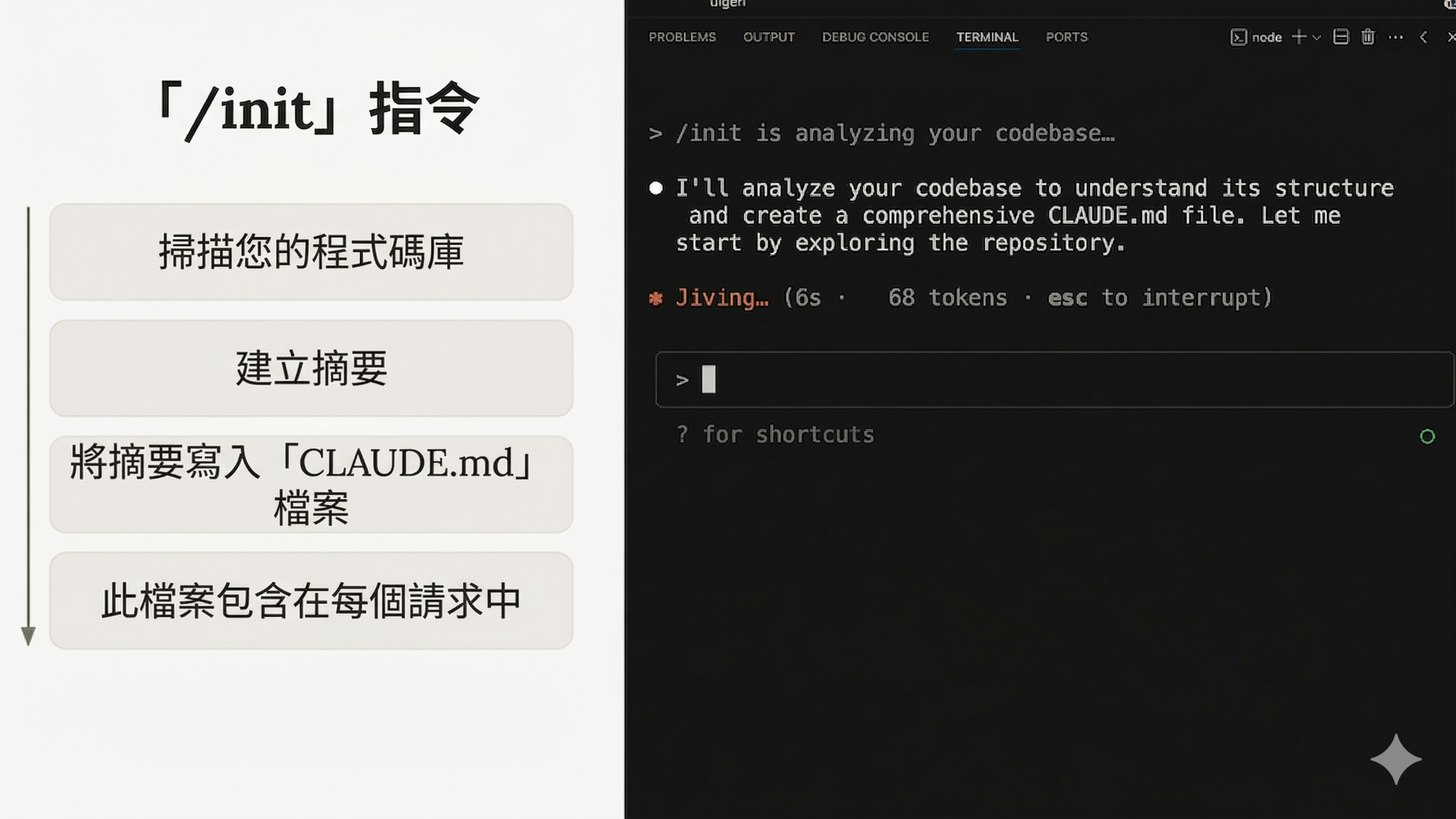
掃描 codebase → 建立摘要 → 寫入 CLAUDE.md → 每次請求自動包含。
【官方】CLAUDE.md 三層架構
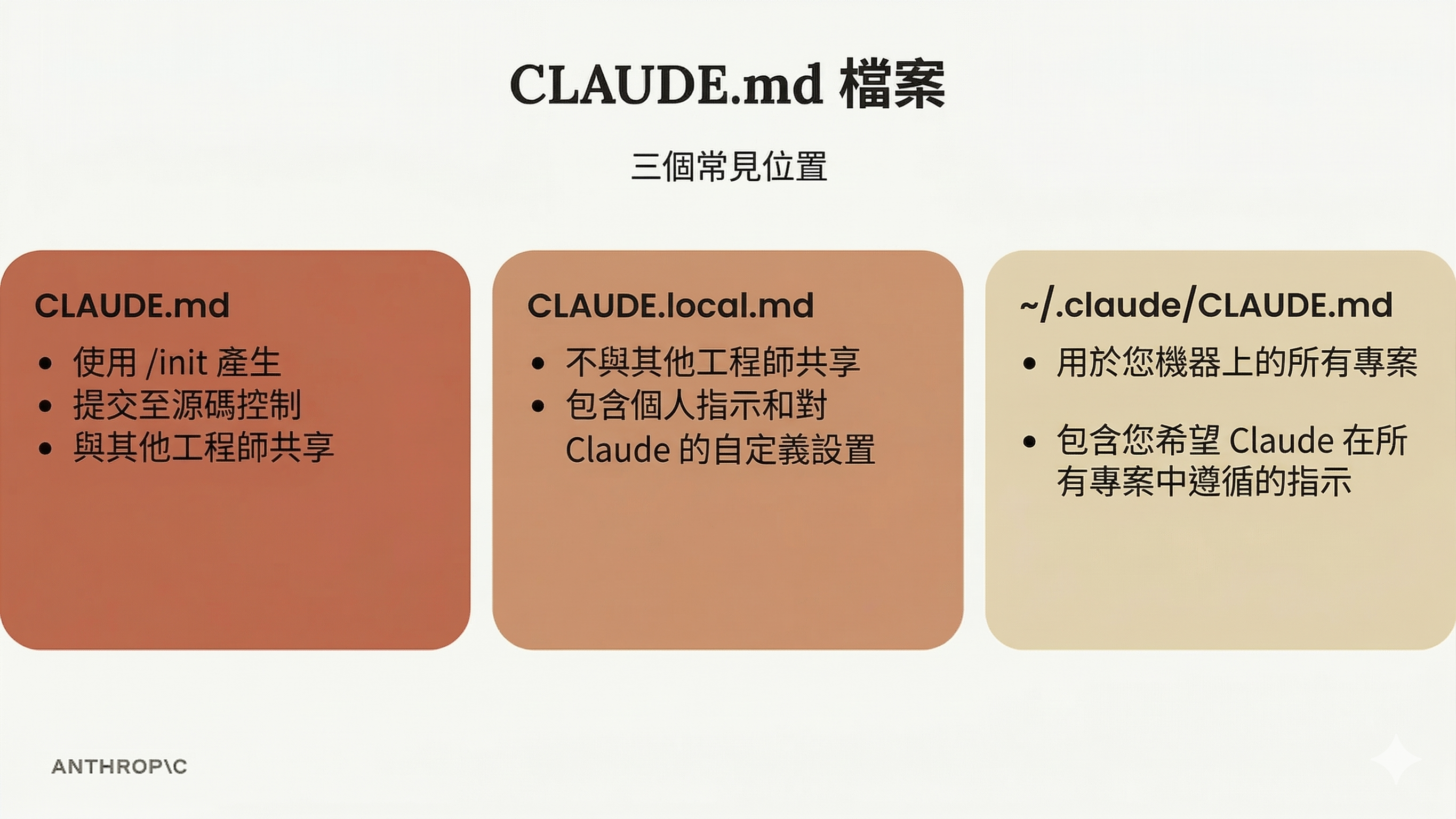
| 檔案 | 用途 | 共享性 |
|---|---|---|
| CLAUDE.md | 由 /init 產生,描述專案架構 | 提交版本控制,團隊共享 |
| CLAUDE.local.md | 個人指示和客製化 | 不共享 |
| ~/.claude/CLAUDE.md | 所有專案通用指示 | 個人使用 |
【官方】快捷操作
| 功能 | 說明 |
|---|---|
#(memory mode) | 自動將指示合併到 CLAUDE.md |
@ 提及檔案 | 自動包含檔案內容到請求中 |
【補充】四大 CLI Agent 的 Context 機制對照
| 工具 | 專案指示檔 | 自動掃描 | 機制特色 |
|---|---|---|---|
| Claude Code | CLAUDE.md | /init 自動生成 | 三層架構(專案/本地/全域)+ # memory mode |
| Codex CLI | AGENTS.md / CODEX.md | 無 | OS 沙盒內讀取,支援 MCP |
| Gemini CLI | GEMINI.md | 無 | JIT 載入,子目錄動態切換 |
| Copilot CLI | .github/copilot-instructions.md | 無 | 路徑拆分(applyTo glob),適合大型企業 |
跨工具趨勢:
AGENTS.md通用標準崛起——多工具開發者推廣單一 AGENTS.md 作為 Single Source of Truth,讓同一個規則檔能被 Claude Code、Codex CLI、Gemini CLI 共用。
【進階】真實世界的 CLAUDE.md 範例
/init產生的只是起點。真正的威力來自持續經營。以下是社群中實際在用的 CLAUDE.md 案例。
範例 1:Boris Cherny(Claude Code 創造者)的團隊 CLAUDE.md
## Workflow Orchestration
### 1. Plan Mode Default
- Enter plan mode for ANY non-trivial task (3+ steps or architectural decisions)
- If something goes sideways, STOP and re-plan immediately

### 2. Self-Improvement Loop
- After ANY correction from the user: update 'tasks/lessons.md' with the pattern
- Write rules for yourself that prevent the same mistake

### 3. Verification Before Done
- Never mark a task complete without proving it works
- Ask yourself: "Would a staff engineer approve this?"

### 4. Autonomous Bug Fixing
- When given a bug report: just fix it. Don't ask for hand-holding
- Go fix failing CI tests without being told how
重點:他的團隊 CLAUDE.md 有 ~2.5k tokens,「每當 Claude 做錯就寫進去」— 複利經營。
範例 2:Anthropic 官方(anthropic-cookbook)
## Code Style
- Line length: 100 characters
- Quotes: Double quotes
- Formatter: Ruff

## Key Rules
1. API Keys: Never commit .env files. Use dotenv.load_dotenv()
2. Dependencies: Use `uv add <package>`. Never edit pyproject.toml directly.
3. Models: Use current Claude models. Never use dated model IDs
   (e.g., `claude-sonnet-4-6-20250514`). Always use the non-dated alias.
5. Quality checks: Run `make check` before committing.
重點:連 Anthropic 自己的 CLAUDE.md 都很精簡,聚焦在「Claude 會犯的具體錯誤」。
範例 3:HumanLayer(ASCII 架構圖一行抵千言)
來源 — 被社群引為「理想的 CLAUDE.md」(僅 57 行)
## Architecture Flow
Claude Code → MCP Protocol → hlyr → JSON-RPC → hld → HumanLayer Cloud API
                                         ↑         ↑
                                    TUI ─┘         └─ WUI

## TODO Annotations
- TODO(0): Critical - never merge
- TODO(1): High - architectural flaws, major bugs
- TODO(2): Medium - minor bugs, missing features
- TODO(3): Low - polish, tests, documentation
重點:一行 ASCII 架構圖取代好幾段文字。TODO 分級讓 Claude 知道什麼該優先處理。
範例 4:Snowplow(領域術語強制)
## Snowplow terminology
- Always capitalized: Event Studio, Snowtype, Snowplow CDI, Signals
- Never capitalized: entities, events, schemas, data structures
- Use "entity", never "context". Use "self-describing event", never "unstructured event".
重點:領域術語強制是 AI 絕對不會自己知道的東西。沒寫進指示檔,它一定會用錯。
範例 5:Bezy 字型編輯器(架構 Gotcha 防炸彈)
## CRITICAL: TUI Output Protection (HIGHEST PRIORITY)
**NEVER write code that outputs to stdout/stderr directly:**
- NEVER use `println!()` - breaks TUI
- NEVER use `eprintln!()` - breaks TUI

## Key Design Patterns
- Transform vs FontIR:
  - Transform = temporary visual display only
  - FontIR = permanent font data (what gets saved)
  - Common bug: Updating only Transform means changes look correct but won't save
重點:架構特有的地雷。不寫進指示檔,AI 一定會踩到。
範例 6:centminmod(Memory Bank 系統)
來源(2,100+ stars)
## Memory Bank System
- CLAUDE-activeContext.md - Current session state, goals, and progress
- CLAUDE-patterns.md - Established code patterns and conventions
- CLAUDE-decisions.md - Architecture decisions and rationale
- CLAUDE-troubleshooting.md - Common issues and proven solutions

## BANNED - Never Use These Slow Tools
- find → use fd or rg --files
- grep → use rg instead
- tree → NOT INSTALLED, use fd instead
- cat file | grep → use rg pattern file
重點:Memory Bank 模式(多個 CLAUDE-*.md 檔案分工)適合大型專案。工具禁令讓 AI 不會用慢的指令。
老手才會寫進指示檔的 10 種內容
| # | 類型 | 範例 | 為什麼新手不會想到 |
|---|---|---|---|
| 1 | 常見錯誤排解 | $ANDROID_HOME is not set → $HOME/Library/Android/sdk | 每次新 session AI 都會踩到的坑 |
| 2 | TODO 分級標註 | TODO(0) 到 TODO(4) 嚴重度 | AI 不知道哪個 TODO 該先修 |
| 3 | ASCII 架構圖 | A → MCP → B → API → C | 一行取代好幾段描述 |
| 4 | 「Never X, Always Y」 | "entity not context"、"println breaks TUI" | 領域特有禁忌,AI 不可能自己知道 |
| 5 | 驗證指令順序 | "run tsc → test → lint → build" | AI 不知道你的 CI 順序 |
| 6 | 自我改進迴圈 | "被糾正後更新 lessons.md" | 讓 AI 自己學習 |
| 7 | Memory Bank 檔案 | CLAUDE-decisions.md、CLAUDE-patterns.md | 跨 session 持久化知識 |
| 8 | 工具禁令 | "never use find, use fd" | AI 會選慢的工具 |
| 9 | Git 安全規則 | "NEVER git checkout without confirmation" | 防止 AI 破壞性操作 |
| 10 | AI vs 人類文件分離 | "AI reads CLAUDE.md, humans read README.md" | 避免指示檔污染 README |
CLAUDE.md 撰寫原則
- 注意力預算:Claude Code 的 system prompt 已有 ~50 條指令。模型能遵循約 150-200 條。你的 CLAUDE.md 只剩 ~100-150 個 slot。每加一行都會讓其他行更不可能被遵循
- 甜蜜點:40-80 行,60 行以下最理想
- Matt Pocock 的 plan loop:加兩行就能大幅改善——「At the end of each plan, give me a list of unresolved questions to answer, if any.」
- 不要讓 LLM 做 linter 的事:縮排、trailing commas、import 排序不該放在指示檔,用 eslint/prettier/ruff
- 每個禁止都要附替代方案:❌ "Don't use any" → ✅ "Don't use
any; useunknownand narrow the type" - Progressive disclosure:CLAUDE.md 是索引,docs/ 是圖書館。AI 需要時自己去翻書
社群趨勢:
- 「負面約束」比「正面鼓勵」有效:❌ "We prefer fetch" → ✅ "Do not use axios; use native fetch API"
AGENTS.md通用標準崛起:多工具開發者推廣單一 AGENTS.md 作為 Single Source of Truth- 指示檔複利經營:每當 AI 犯錯,不只在對話中糾正,立刻寫進指示檔。但要定期修剪——過時的規則會浪費注意力預算。大型專案考慮用 Memory Bank(多個 CLAUDE-*.md 動態加載)取代單體式 CLAUDE.md
更多範例:awesome-claude-md / centminmod/my-claude-code-setup(2,100+ stars)
【進階】Session 管理心法
| 指令 | 用途 |
|---|---|
/compact | 壓縮對話釋放 context |
/compact focus on auth | 壓縮時聚焦特定主題 |
/context | 查看 context 使用狀況 |
/cost | 監控 token 消耗 |
/rename | 命名 session(方便日後恢復) |
/clear | 開新 session(舊的保留可恢復) |
Context Window 70-75% 是死亡線:多個開發者記錄,context 到這個比例時 Claude 開始忘記決定、幻想檔案路徑。超過 80% 就 /compact。
Handoff Strategy:長對話讓 AI 降智時,請 Claude 寫 handoff.md(進度 + 架構決定 + 待辦),/clear 後說「讀取 handoff.md 繼續工作」。瞬間恢復 AI 智商。